
如何基于现有富文本编辑器(如 Slate、TipTap、Monaco)扩展支持 AIGC 插件?比如一键生成段落或续写?
一、核心架构设计
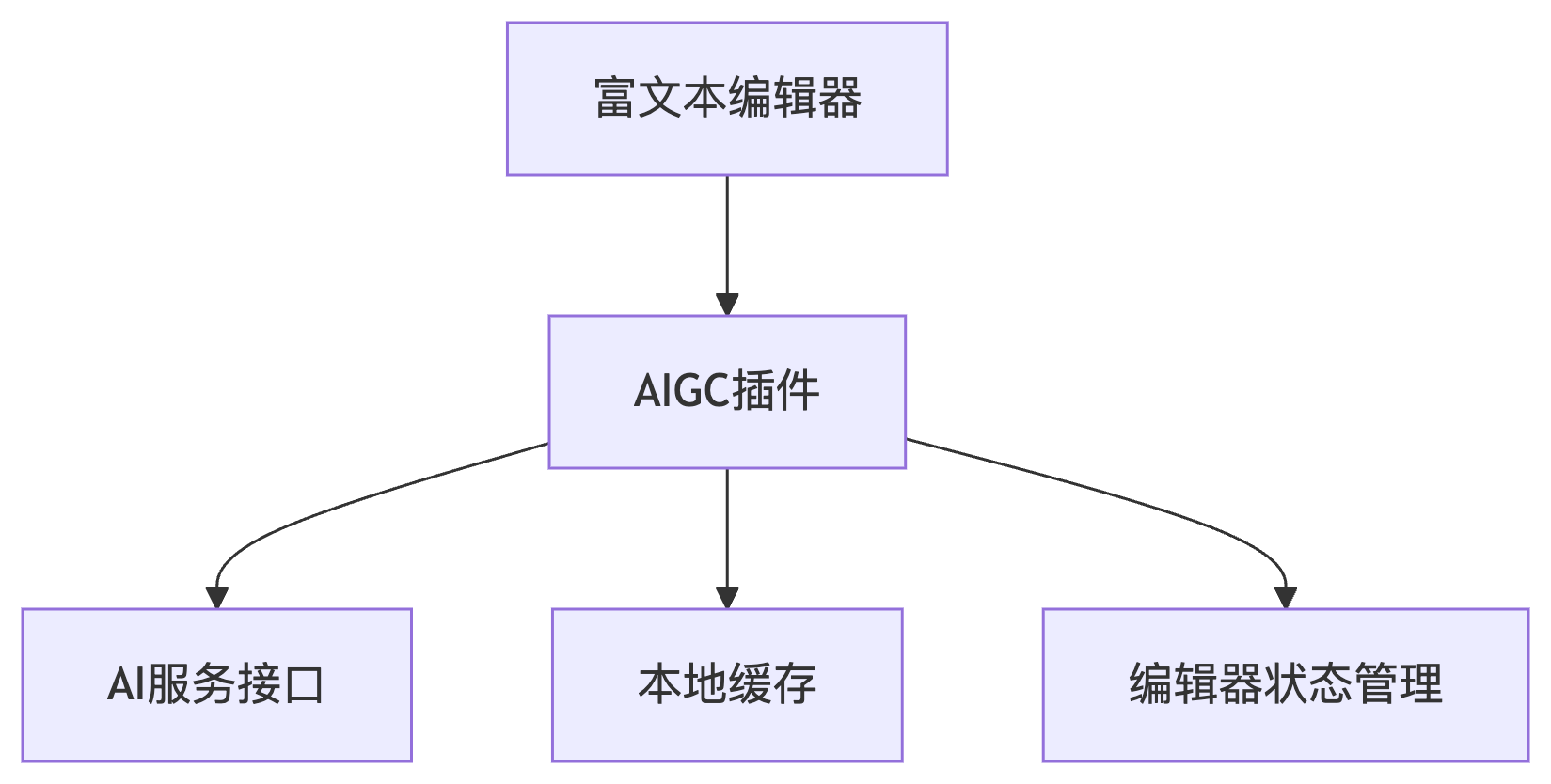
二、编辑器实现方案
Slate.js 实现
typescript
// 注册AI命令扩展
const withAIGC = (editor: Editor) => {
    const { insertText } = editor;

    editor.aigenerate = async (type: 'paragraph' | 'continue') => {
        const selection = editor.selection;
        if (!selection) return;

        // 获取上下文文本
        const context = Editor.string(editor, Editor.above(editor)?.trim() || '';

        // 调用AI服务
        const aiResult = await fetchAICompletion({
            prompt: type === 'continue' ? context : '',
            mode: type
        });

        // 插入结果
        Transforms.insertText(editor, aiResult, { at: selection });
    };

    return editor;
};

// 使用示例
<button onClick={() => ReactEditor.aigenerate(editor, 'paragraph')}>
    生成段落
</button>
三、关键技术实现
1. 上下文感知获取
javascript
// 获取光标前后各200字符作为上下文
function getEditorContext(editor) {
    const { selection } = editor;
    const range = {
        anchor: { path: selection.anchor.path, offset: Math.max(0, selection.anchor.offset - 200) },
        focus: { path: selection.focus.path, offset: selection.focus.offset + 200 }
    };
    return Editor.string(editor, range);
}
2. 节流请求优化
typescript
const aiRequestQueue = new Map();

async function throttledAIRequest(key, prompt) {
    if (aiRequestQueue.has(key)) {
        return aiRequestQueue.get(key);
    }

    const promise = fetchAICompletion(prompt)
        .finally(() => aiRequestQueue.delete(key));

    aiRequestQueue.set(key, promise);
    return promise;
}
3. Markdown兼容处理
javascript
// 转换AI生成的Markdown为编辑器节点
function parseAIContent(content) {
    const md = new Remarkable();
    const tokens = md.parse(content, {});

    return tokens.map(token => {
        if (token.type === 'paragraph_open') {
            return { type: 'paragraph', children: [] };
        }
        // ...其他转换规则
    });
}
四、用户体验优化
1. 渐进式加载动画
tsx
const [isGenerating, setIsGenerating] = useState(false);

const handleGenerate = async () => {
    setIsGenerating(true);
    try {
        const result = await editor.aigenerate();
        // 逐字插入效果
        for (let i = 0; i < result.length; i++) {
            await new Promise(r => setTimeout(r, 20));
            Transforms.insertText(editor, result[i], { at: editor.selection });
        }
    } finally {
        setIsGenerating(false);
    }
};
2. 多候选结果处理
javascript
// 显示候选结果浮层
function showAIOptions(editor, results) {
    const popup = document.createElement('div');
    popup.className = 'ai-options-popup';

    results.forEach((text, i) => {
        const option = document.createElement('div');
        option.textContent = text.substr(0, 50);
        option.onclick = () => {
            Transforms.insertText(editor, text);
            document.body.removeChild(popup);
        };
        popup.appendChild(option);
    });

    // 定位到光标下方
    const [node, path] = Editor.node(editor, editor.selection);
    const domNode = ReactEditor.toDOMNode(editor, node);
    const rect = domNode.getBoundingClientRect();
    popup.style.top = `${rect.bottom}px`;
    popup.style.left = `${rect.left}px`;
    document.body.appendChild(popup);
}
3. 错误恢复机制
typescript
// 失败时保留草稿并重试
async function safeAIGenerate(editor, retries = 3) {
    const originalText = Editor.string(editor, editor.selection);
    try {
        return await editor.aigenerate();
    } catch (error) {
        if (retries > 0) {
            Transforms.insertText(editor, originalText);
            return safeAIGenerate(editor, retries - 1);
        }
        throw error;
    }
}
五、生产环境注意事项
API安全:
- 使用JWT签名请求
- 限制用户每分钟调用次数
javascript// 请求签名示例 const signRequest = (prompt) => { const nonce = crypto.randomUUID(); const signature = crypto.createHmac('sha256', SECRET) .update(`${prompt}:${nonce}`) .digest('hex'); return { prompt, nonce, signature }; };本地缓存:
typescript// 使用IndexedDB缓存常见请求 const cacheAIResponse = async (prompt, result) => { const db = await openDB('ai-cache', 1); await db.put('responses', { prompt, result, timestamp: Date.now() }); };性能监控:
javascript// 埋点记录生成耗时 const start = performance.now(); const result = await fetchAICompletion(prompt); trackEvent('ai_generate', { duration: performance.now() - start, length: result.length });
题目要点:
- 编辑器集成:通过扩展各编辑器的命令系统实现无缝接入
- 上下文感知:智能获取光标周围文本作为AI提示
- 渐进式交互:流式插入结果增强用户体验
- 健壮性保障:错误重试和本地缓存机制
- 安全防护:请求签名和频率限制